Best apps for Android Wear smart-watches

Best Android Wear smartwatch apps


Android Wear is Google’s wearables platform for smart-watches. The operating system works on both watches with square and round faces in a variety of styles. Regardless of which device you choose, Android Wear apps will work the same.

At the core of Android Wear is app notifications. You can view all of your notifications, and even act on some, without taking out your phone. Extended Android Wear functions are being added to existing apps and some apps even run independently from your phone.

But what are the best Android Wear apps? Let’s find out.

Majority of messaging apps

This category is pretty broad, but if you use almost any messaging app like Hangouts,WhatsApp, Facebook Messenger, KakaoTalk, and Telegram can all push notifications to Android Wear.

Android Wear kakaotalk

Instead of an audio or vibration notification on your phone, your Android Wear watch receives the notification. Some apps even let you reply with your voice. This means you’re less likely to miss a message.

It’s still up to developers to add functionality, but even as a simple notification it’s a worthwhile feature.

Google Play Music

android wear google play music

Google Play Music is a great cross-platform service. It works on the web and through the app but also has Android Wear specific features. You can control playback and volumethrough your smartwatch instead of opening the app on your phone. Also included is the ability to download music directly so you don’t have to have your phone with you. You can pair Bluetooth headphones to your watch and listen to music.

Google Fit

android wear google fit

Android Wear still hasn’t figured out how to be a great fitness tracker. Some Android Wear smartwatches lack a heartbeat sensor so you’ll be missing  that data. Of course, other fitness trackers sell their own wearables and sync through an app so you might not even need Google Fit.

But for someone who wants to keep track of their steps throughout the day, Google Fit is perfectly fine. It syncs from the watch and the Android app. You don’t need to have the smartwatch connected all the time because it can sync once it’s connected again. Google Fit can track walking, running, and biking as the most common activities, but you can add different sports.

I think of Google Fit as a passive fitness counter rather than those with dedicated fitness bands, but you could also try RunKeeper if you want to keep track of your running.

Google Maps

android wear google maps

The best apps for Android Wear right now are Google’s apps. This makes sense because they can show off their own platform.

The best part of Google Maps for Android Wear is that it displays navigation directionson your smartwatch. While this isn’t as useful when driving, getting walking directions without having to carry your phone is very useful. I felt safer using Google Maps on my Android Wear device in Barcelona and Seoul because I didn’t have  to pull out my phone out at night.

Lyft

android wear lyft

There’s a function in Android Wear to Call a car. Right now, the only option is with Lyft but this lets you call a car to your location without opening the app. With taxi-alternative services everywhere, it’s a nice option to be able to get a ride without opening the app directly, especially after a long night out.

IFTTT

ifttt android wear

If you use IFTTT a lot, then you know how useful recipes can be. If you haven’t  tried  IFTTT, the number of things you can automate using the service will  blow your mind. IFTTT’s use with Android Wear is as open as the recipes that you make for it. Some examples shown are to turn off your lights, follow friends’ check-ins through Foursquare, and excusing yourself with a fake phone call. You can find a lot more recipes on the IFTTT site.

Pinterest

pinterest android wear

Pinterest is your personal collection of interesting things around the web. Pinterest added a feature that will notify you when you’re close to a physical location that you’ve pinnedusing Android Wear.

Tinder

tinder android wear

Tinder uses Android Wear as a fun extension for the app. With its swipe functionality, Tinder adds the ability to swipe yes or no to people you see on the app. All you have to say is “Start Tinder” and the app will open on the watch so you can pick and choose the people you like around you.

Google Keep

Android Wear google keep

Keep is a first party note taking app. You can create lists, snap photos, and write quick notes. Google Keep can also record voice memos and that’s extended to Android Wear. You can say “Take a note” and Android Wear will record a short message and save it in Google Keep. With the ability to share and collaborate with other people, Keep is a great way to share things quickly.

Trello

trello android wear

Trello is a great way to keep tabs on productivity between different teams. Trello on Android Wear extends the use of the app by letting you comment on notifications with your voice, create cards on Android Wear, and get reminders for due dates. It’s a great way to know what’s going on all the time while not needing your phone out all the time.

Android Wear watch faces

Even before Google released the official API for watch faces, developers were creating faces for Android Wear. With the updated firmware, official Android Wear watch faces can be downloaded. Google isn’t deleting existing watch faces, but requiring them to use the official API by January 31, 2015.

The usefulness of Android Wear’s watch faces comes from how developers include information. In some cases it’s adding a company’s brand, but others add more useful information like the weather right on the face. The list of official watch faces is expanding and feature both free and paid watch faces.

surfline watch face android wear

Surfline shows surfing-related information directly.

specialized bikes android wear

Specialized Bikes Watch Face shows current weather, sunrise, sunset, and expected rainfall.

battery watch face android wear

Battery Watch Face shows battery life of Android Wear.

500px android wear

500px adds random images from 500px or your personal account.

Expect more Android Wear watch faces to release in the future.


WhatsApp plans for Voice Calling Update

All the way back in Feb., WhatsApp promised that voice calling was on the way for the popular messaging app. Now, it looks like the Facebook-owned company is finally ready to roll out the new feature after it leaked in a recent update to WhatsApp for Android.

The leak comes directly from WhatsApp’s website, where the company often pushes out new features before they hit the app store, and was uncovered by Dutch tech blog Android World. The latest update doesn’t actually let you make voice calls, but offers details on how it will work. Based on this new information, it looks like you’ll soon be able to make WhatApp calls over 3G, 4G or Wi-Fi, and even record your calls and listen to them again later from inside the app.

Based on all this leaked info, Android World was able to create a handful of images showing what voice calling will look like. Of course, it’s possible WhatsApp isn’t done tweaking the new feature, but the images above look pretty good already.

It’s unclear if WhatsApp voice calling will get an official launch by the end of 2014, which is approaching quickly, though that’s what the company promised earlier this year. Back then, CEO Jan Koum said he was still hammering out deals with the major carriers, so it’s possible that could be holding back the release.


Samsung’s First 4GB RAM for Mobile Devices


samsung 4gb ram

You want 4GB RAM in your next phone, right? Whether you do or not, it’ll likely happen, thanks to Samsung beginning mass production of the “next generation of ultra-fast, high density mobile memory technology.” Announced via their own blog, Samsung expects to provide these new 4GB LPDDR4 packages to vendors and device manufacturers in early 2015.


Samsung says that this new RAM is the industry’s first 8 gigabit (Gb) low power double data rate 4 (LPDDR4) mobile DRAM, sporting an I/O rate of 3,200 Mbps, which is “two times faster” than typical DDR3 RAM used in PCs. We are talking support for UHD video recording and playback, plus continuous shooting of 20MP+ images.

Beyond the speed, Samsung also reduced the operating voltage, allowing these new 8Gb RAM packages to save up to 40% of power compared to similar 4Gb packages. On that note, Samsung also started producing (and providing to manufacturers) new 2GB and 3GB RAM packages based off this new 8Gb technology, which should mean the same power saving in other devices that adopt the smaller RAM amounts.


Google plan to launch a native Android Auto


Google Android Auto


Google may be planning to launch a version of Android Auto for vehicle infotainment centers — also known as head units — that will eliminate the need for a smartphone to be connected, giving native access to the Internet and mobile applications.

Today, Apple’s CarPlay, or open source standards such as MirrorLink or GENIVI, enable vehicle infotainment centers to mirror a version of a smartphone OS onto a vehicle’s head unit, thereby enabling the driver to use specific applications, such as Google Maps or iTunes. Google also announced Android Auto earlier this year, which when available next year, will mirror a connected Android smartphone to the car’s head unit.

apple carplayApple Apple’s CarPlay interface requires an iPhone to be plugged into the car’s infotainment center.
The difference with what Google may be planning, according to one report, is that Android Auto would be native on the head unit, and a driver would no longer necessarily need a smartphone to connect to those applications and the Internet.

android auto micro usb connection copy 580 90

Thilo Koslowski, a vice president at industry research firm Gartner, said what Google may be planning should be no surprise as executives talked about it when they announced the formation of the Open Automotive Alliance (OAA) earlier this year. The OAA includes Google, Audi, General Motors, Honda, Hyundai and processor chip company Nvidia.

During the initial OAA announcement, Google talked about the car eventually becoming another device platform, Koslowski said.

The difference, according to the Reuters report, is that the upcoming version of Android Auto (or whatever Google decides on calling it) won’t be mirroring an application interface from a connected smartphone; it will have that interface natively.

Google Android Auto Google
The current version of Android Auto, which requires a connected smart phone, will allow drivers to use applications such as Google Maps to navigate.

“It just allows you to get applications more quickly and naturally,” Koslowski said. “Think about the social networking capabilities, not that you would physically text, but you could talk to the system. Your car could also announce your location to others by automatically updating your status on Google+.”

Taking it a step further, Google Auto could also talk to the Internet of Things, such as your home’s Nest thermostat and tell it to turn up the temperature as make your way home.

“You car becomes a big mobile device. I call this the Internet of Cars, which is part of the Internet of Things,” Koslowski said. “Some people may find that creepy, but I think there’s a lot of value in it too.”


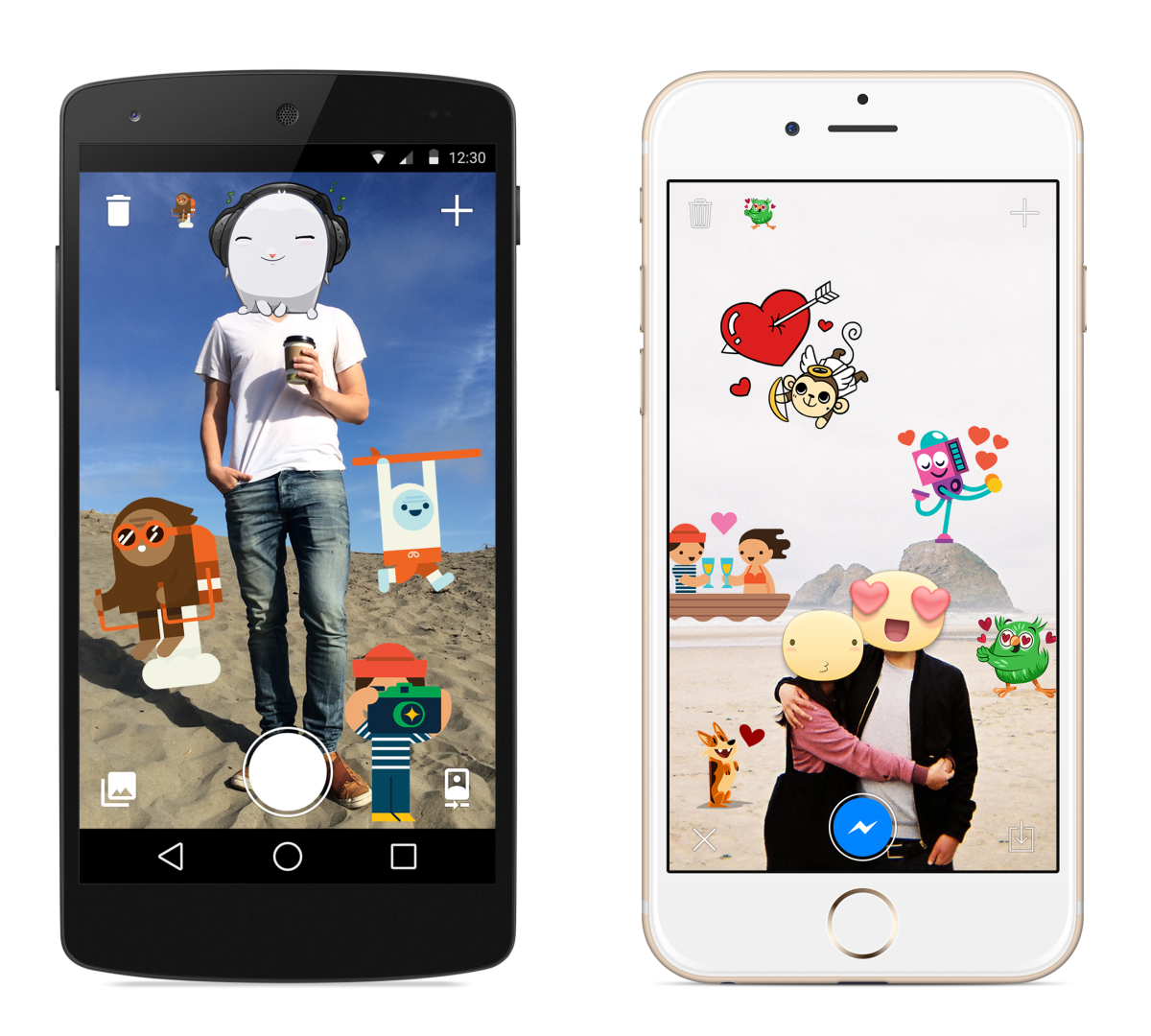
Facebook’s crazy sticker app is now available for iOS

Last week, Facebook surprised us with a new app that lets you put stickers on photos, but it was available for Android users only.


The app lets you put stickers on any photo; you can import an existing photo or take a new one and add stickers to your heart’s content. Stickered is geared up to drop you into Facebook Messenger after you’re done, but you don’t need it to use the app.

stickered press 011 730x657 Facebooks crazy sticker app is now available for iOS

Facebook today made the app available for iOS in addition to the app released last week for Android users, so you can sticker up your photos just in time for Christmas.

➤ Facebook Stickered [iOS App Store]


Android File Transfer: How To Transfer Files Between Android And Mac

You plug your Android phone into your Mac, and nothing happens. Sound familiar?

Don’t worry: here’s how to transfer files between Android and OS X — Earth’s best mobile and desktop operating system, respectively.

On Windows, you can plug in an Android phone and explore your files, just like any other hard drive. Macs are different, and it’s annoying, but there is an official fix. There are also third-party solutions that (while flawed in some ways) might be even better for you.


Android File Transfer: The Easy Way

Android File Transfer is a free Mac app from the Android team. With it installed, you’ll see a window like this every time you plug in your device:

android file transfer Android File Transfer: How To Transfer Files Between Android And Mac

From here you can transfer files to and from a separate Finder window. Simple.

You might notice that my Android’s file system is a bit of a mess. Guilty. I should probably get around to cleaning that up. Happily it’s easy to do with this tool: I can CMD- or right-click any file and click “Delete”.

android file transfer right click Android File Transfer: How To Transfer Files Between Android And Mac

I point this out only because there doesn’t seem to be many other features. Seriously: copy-paste doesn’t work, there’s no search, and you can’t use quick look to preview your files. Pretty much all you can do is transfer and delete files.

This is your best option for the quick transfer of files. If you want full integration with your Mac’s Finder (or one of its alternatives), you’re going to need to try a third-party tool.

The WiFi Alternative: DroidNAS

If you want to browse Android files using the Finder, you won’t find a USB option. You can, however, acquire your files over the network — and a program called DroidNAS is the simplest way to set that up. It’s one of many ways you can access your Android device wirelessly.

droidnas on screen Android File Transfer: How To Transfer Files Between Android And Mac

In just a few taps, you can make your Android’s various folders, including the entire SD card, shared on the network. This gives you full access to your files from Finder, assuming both devices are on the same network.

droidnas working Android File Transfer: How To Transfer Files Between Android And Mac

In my tests, browsing folders was a little slow, but everything worked. I transferred a half-gig file to my Android device without any hiccups.

In theory DroidNAS is supposed to make your Android device visible from Finder, so you need only click an icon to start browsing your files. If you’re using Mavericks or later, however, that won’t work.

droidnas fail Android File Transfer: How To Transfer Files Between Android And Mac

DroidNAS hasn’t fixed this problem, instead offering this workaround:

Press Cmd+K in Finder and enter IP address AND share:

smb://IP_ADDRESS:Port/Share

for example:

smb://192.168.1.101:7777/SD Card

Here’s what that looks like:

droidnas connect Android File Transfer: How To Transfer Files Between Android And Mac

It’s a bit of extra work, sure, but after setting it up once, you’ll get the hang of it.

It’s not a perfect solution, and it’s a lot slower than Android File Transfer’s wired connection. But if you’d rather not fuss around with wires, it’s a good approach.

More Solutions

Do neither of these options quite work for you? There are other options out there. A quick rundown:

  • Cloud and syncing services, such as Dropbox, can make transfers quick. Just drop the file into a synced folder, then download it using the Android client.
  • Dukto, which lets you transfer files between any two operating systems, works for quickly sharing any individual file. You can’t browse the file system, but you can quickly send a file or text snippet from one device to another.
  • ES File Manager, an excellent file manager for Android, has the ability to browse network shares. Set up your Mac for file sharing, and you can browse those files from your Android device.
  • AirDroid offers file sharing between Android and Macs

These are all great options, but in terms of simplicity, I think a USB cable and Android File Transfer is your best bet.

Disagree? Let me know in the comments below, and also feel free to point out which tools you think are best for the job. I look forward to learning.


5 apps to turn your smartphone into a personal assistant


Smartphone1


Luckily You can now hire (a.k.a. download) a personal assistant without leaving the confines of the App Store. So whether you’re scheduling a meeting or planning the most efficient route across town, a smartphone can be your most useful asset.

Read on for our favorite apps that double as a personal assistant. Beware: Once you start using them, people’s expectations of you will skyrocket.

1. Google Now

Word on the street is that a little company called Google is pretty good with technology — so how could we expect their assistant app to be anything other than top-notch? Google Now is marketed as the “intelligent personal assistant,” available for both iOS and Android. You can also run the program on personal computers via Chrome. Use this nifty app to set geo-triggered reminders, store airline boarding passes and check the weather at an upcoming destination. Best of all, the latest version’s features include barcode scanning and song recognition.

2. Dragon Go

While it doesn’t have all of the shiny functions of Google Now, Dragon Go is the best at one thing: Dictation. Its speech recognition technology will enable you to draft emails, texts and memos on the go — without the hassle of including another human in the process. Dragon Go has an unprecedented level of accuracy when transcribing — even better than Siri. It can also sync with Netflix, iTunes and Spotify for voice control.

3. vokul

If Dragon Go is the best at dictating, then vokul leads the pack for voice control. The app enables you to go hands-free, and will work in noisy environments like your car or the office. Ask vokul to read your social media feeds, or fast forward to a certain point in a song. Unlike Siri, which requires you to tap your phone for activation, vokul will activate upon hearing the words “hey vokul” — so as long as the app is open, no hands are needed. In fact, it’s the only 100% hands-free voice control app available.

4. Robin

Named after Batman’s perennial sidekick, this Android app has everything you need in a great personal assistant. This voice-recognition app has special features, such as the ability to search for cheap parking. Robin can also check for directions, conduct hands-free messaging and deliver news from its artificially intelligent newsroom. It’s clear why this app has dubbed itself the “Siri challenger.”

robin

5. 24me

This free app — which prides itself on an uncluttered, easy-to-use interface — marries your tasks with your calendar. Auto-generated reminders will ensure no event is forgotten, while enabling you to easily share notes and content with friends. And, as of recently, it is also available for Android users. Sync it with your other apps, like Facebook, to ensure every bill, event and task is included in your automated reminders.


The Cicret Bracelet will make your arm the future of devices

The Cicret Bracelet will make your arm the future of devices


As wearable technology continues to evolve and define the space, as well as redefine mobile in general, we get to enjoy the hatching of new ideas. It really is quite remarkable, as seeing a completely new set of ideas form and become an entirely new, tangible product does not happen that often.

2014 could arguably be called the “dawn of the wearable.” It was not the launch by any means, but this was the year we started to see more than just a few companies exert real effort to cater this product to the consumer.

In addition to that, we have seen dozens of smaller crowd-sourced ideas over the past year, and we have also seen how successful, and versatile the various ideas of wearables can be. Aside from Google Glass, whose display creates the impression of a large image a few feet away, most wearable ideas so far have been connected wrist wear.
Android Wear, Samsung’s Tizen powered brood, Pebble, and soon the Apple Watch, all make a play on the enduring wristwatch. While these new devices are not meant to necessarily replace the smartphone, as the first generation of users, we will find ourselves with the longest wish list for features or functionality.

Physically speaking though, one of the challenges is the size of the display. While we have watched smartphones balloon in size over the past couple years, it is fair to say that we may not want to demand such an evolution on our wrist. Who really wants to strap a 5-inch display to his or her arm?

Turns out you may not have to. Cicret (pronounced “secret”), based in Paris, France, is designing a bracelet that will be equipped with a picoprojector and an array of proximity sensors. The projector emits an image on your forearm, and as you interact with the image, the proximity sensors determine the gesture action or execution command.

The design and technology behind the Cicret Bracelet is still in development. In lieu of a crowdfunding campaign which would most certainly find a number of delays, the company is flat-out seeking donations from the world at large to help them fund not only the bracelet, but to also expand availability of the company’s secure messaging app, CICRET (beta available in Google Play, linked below).

If they reach a goal of €300,000 ($373,600; £237,500), Cicret will be able to develop its secure messaging application across all platforms. Raising €700,000 ($872,000; £554,000) will give the company the backing it needs to continue prototype development of the Cicret Bracelet. A donation earns a spot on the company’s Wall of Fame, and gratitude.

If the Cicret Bracelet can make it to production, expect a retail cost somewhere in the €380 ($475; £300) range. The currently projected specifications are the normal cast of characters, accelerometer, memory card, micro USB, Bluetooth, Wi-Fi, LED, 16GB or 32GB, 10 colors options, and possibly a SIM card so the Cicret Bracelet can operate as a standalone mobile device.

A working prototype is said to be unveiled in just a few short weeks, and that Cicret says that its bracelet will pick-up where Google Glass left off. The final design is expected to support Android and iOS.


Here are 8 great Android apps that Google does not allow on Play store

Here are 8 great Android apps that Google does not allow on Play store


google play store


Google might have a mind-boggling over 1 million applications in its Play Store, but you just won’t find certain apps there. Google has some tight regulations for Android apps and it simply removes applications if they breach its terms. For instance, you won’t find applications that can download videos or music from YouTube. You also won’t find ad blockers for Android.

This article, however, does not aim to reason whether this is right or wrong. We’re just stating the facts, and trying to show what’s on the other side of the Google Play Store fence.

There is one key advantage about Google’s operating system – it is free and open, and Google Play is not the only source of apps. You’ve all heard about the Amazon Appstore for Android, but it is not the only one – more popular Play alternatives include GetJar and Slide Me. And those are just the tip of the iceberg.

If you know what you’re looking for, you can find some great Android apps not available on Google Play. We’ve summarized the most notable secret and forbidden Android apps not allowed on the Google Play Store right below. Take a look.


MIUI Music

Price: Free

Category: Music player / streamer
Download APK on MIUI.com
MIUI Music is the stock music app in Xiaomi phones, and while the devices themselves are not all that popular outside of Asia, the app itself is a strange creation that allows you to download music on your phone for free. Using MIUI Music feels a bit like using Spotify Premium, without having to pay anything at all.

Amazon Appstore

Price: Free
Category: App store
Download on Amazon
The Amazon Appstore is the biggest Google Play rival and don’t make any mistakes about it – Amazon is serious for its Android app business. So serious that it actually launched in China, the world’s largest phone market, earlier than Google Play! With its daily free app promo, there is plenty to like about the Amazon Appstore for both users and developers.

TubeMate

Price: Free
Category: YouTube downloader
Download on TubeMate.net
Once upon a time, TubeMate was available on the then Android Market (now Google Play), but Google went strict on regulations and removed the application for its capability to download videos straight from YouTube. That does not mean that TubeMate died, though. You can still easily get the app to taste and enjoy the forbidden fruit of YouTube downloads.

Dood’s Music Streamer

Price: Free
Category: Music Streamer
Download on Uptodown
In the world of music streaming, you often get something too complicated, requiring registrations, fees and so on. Dood’s Music Streamer is barebones and free, allowing you to download and stream all the music you want – and it can cache songs for offline playback. Neat.

AdAway

Price: Free
Category: Ad blocker
Download on F-Droid
Google Play decided it will no longer tolerate application blockers on Android. We understand Google – after all that’s where most of its profits come from, ads! That does not mean that there is no way to get rid of sometimes too obtrusive ads on Android. AdAway is one great option.

Snes9x

Price: Free
Category: Emulator
Download on X+Alpha
Snes9x is probably the best emulator out there, but for some reason it was pulled from Google Play. Like many others, it still exists and is still as good, you just need to know where to get it from for a healthy dose of vintage gaming.

Grooveshark

Price: Free
Category: Music
Download on Grooveshark
Grooveshark is one of the most popular music streaming services, but for some reason it is not on Google Play. You can still safely download it from Grooveshark’s official website and enjoy all your music streaming needs from all over the world and not just the States like so many other services.

TV Portal

Price: Free
Category: Video streamer
Download on Uptodown
TV Portal is Hulu for all the regions where Hulu is not supported. And it’s free. You get to stream thousands of movies and TV series, but the downside is that the quality is not high-definition. Still, this will easily become movie junkies favorite app.

Top 8 spy apps for smartphones

Top 8 spy apps for smartphones

We live in some difficult times. Snooping is not a taboo subject anymore. However, as some government agencies (NSA anyone?) might contend, not all snooping is bad. We agree to some extent, although we might raise many eyebrows here for sure! Whatever might be the case, it’s ideal you’re up to date with whatever goes about in this digital age. Today we bring you 8 good Android spy apps!


1.Mobile Spy

Mobile Spy is the next generation of smartphone spy software. Install this small program directly onto the compatible smartphone you wish to monitor to begin recording. Using the Internet capabilities of the phone, recorded activities, logs and GPS locations are quickly uploaded to your Mobile Spy account. To view the results, simply login to your secure account using any computer or mobile web browser. Logs are displayed by categories and sorted for easy browsing.

2.CPU Spy

This is a simple app to display the time the CPU spends in each frequency state. This can be a useful tool in diagnosing battery problems or tweaking your over-clock settings. It also displays the current kernel information.

3.Ear Spy

Ear Spy is a ‘Super Spy’ application which gives you super-hearing and the ability to eavesdrop on those around you. With some bluetooth headsets, you can eavesdrop from the next room. Ear Spy amplifies sound coming through your phone microphone straight to your earphones. To fine-tune the incoming signal, use the graphic audio equaliser.

4.Spy Phone Tracker

Keeps records of all incoming and outgoing phone calls which include phone number called or phone number of party calling the smartphone if information is not blocked by caller. It will also keep record of date and time calls were made and length of calls.

5.Spy Camera OS

Everyone at one time will want to capture an image without anyone noticing it, this open source application will give you an easy, fast and smart way doing it.

6.Monitor Call SMS Location

Remotely monitor SMS, Photo, Location, call-logs and much more. View your phone location in TiSPY web portal. Can find location even when GPS is disabled in device from you cellular information.

7.Mobistealth

Parental control app that can monitor text messages, call details and pictures. It can remotely view appointments, videos, web history and contacts.

8.Anti-Spy Mobile

Nowadays, anyone who has access to your cell phone can easily install a spyware software and monitor your calls, SMS messages, and even your location. Anti Spy Mobile is a free antispyware scanner that detects and removes spyware applications on your cell phone.