Facebook launches messenger for people at work

work_chat_app_screenshot_google_play.jpg

Facebook has launched a version of Messenger that’s meant for the office. The app, first spotted by TechCrunch, is an expansion of Facebook at Work, a business platform Facebook has been testing that allows co-workers to talk and collaborate. Everything about Facebook at Work and its new Work Chat app looks almost identical to the Facebook and Messenger we all know — which means, thankfully, you can still use stickers — the only real difference is that the network is limited to people within a single company. Right now, Work Chat is only available on Android and only for people in companies using the limited Facebook at Work beta. TechCrunch reports that an iOS app is in the works.

Messaging had already been built inside of the core Facebook at Work app, but like with the standard Facebook app, it’s being unbundled, seemingly because the stand-alone app is a bit more capable. There’s also a larger battle around workplace chat that Facebook wants to be part of. Most notably, Slack has been storming the startup world as the chat app to replace basically every other communications tool in your business. Slack doesn’t do much on its own other than chat, but it can be integrated with many other popular tools, like Trello. Facebook at Work, on the other hand, has the advantage of already being familiar to people and offering many of its own built-in tools, like event invites and team pages.

source:TechCrunch

If you like our posts please let us know in comments.

Facebook going to launch “Work apps” for companies

You may already sneak a quick look at Facebook during the day while you’re supposed to be working, but soon visits to the social network could be encouraged or even mandatory. Facebook just unveiled a new app called “Work” designed to create smaller networks within an individual company.

Facebook is launching Work apps for Android and iOS on Wednesday, along with a desktop website, TechCrunch reports. Companies will be able to create separate accounts for their employees, though you’ll also be able to sign-up using your personal Facebook profile. Either way, there’s no crossover between the two apps, and you can run both at the same time on your phone without any issues.

It’s still unclear exactly what the new app will let you do, though it looks like you’ll be able to share documents and post status updates like you would on the regular social network. We may also get the ability to edit files within Work at a later time.

There’s still no word on pricing, though it’s possible Work could be free. That would give the new app an edge over other popular social-enterprise services like Slack. It could also help introduce even more people to Facebook in general, potentially increasing the company’s massive user base even more.

Facebook Work is expected to hit iOS and Android later today, though it could be limited to a handful of pre-selected companies at first.

Facebook apologizes for its, “year in review” app for algorithmic cruelty

If you are spending a lot of time you may have noticed an irritating popup from Facebook called “Year In Review.” The “Year In Review” automatically gathers a selection of the most liked photos from your feeds and pop up messages into your timeline with a tagline declaring “It’s been a great year! Thanks for being a part of it.”

It may sound freakish but in case you have put up a photo of  death of a near and dear one in the family, and the photo has been most liked, Facebook’s Year In Review algorithm will rather cruelly put up that photo in your timeline with a rather inhumane and insensitive tag “It’s been a great year! Thanks for being a part of it.”

That’s exactly what happened to prominent web designer and writer Eric Meyer.  Facebook forced Meyer to relive the utter horror of losing his baby, who had died on 6th birthday in June, 2014 after suffering from brain tumour.  Meyer who is barely out of the grief of his immense personal loss was flabbergasted to see the photo and the very inhumane tagline. He summed it up aptly on his blog,

“I didn’t go looking for grief this afternoon, but it found me anyway, and I have designers and programmers to thank for it. In this case, the designers and programmers are somewhere at Facebook.”

Meyer called it a “algorithmic cruelty” on part of Facebook’s engineers who through the “Year In Review” app forced him to relive the horrors of the moment of his daughters death. From his blog, “Still, they were easy enough to pass over, and I did. Until today, when I got this in my feed, exhorting me to create one of my own. “Eric, here’s what your year looked like!”

Facebook apologizes for its, "year in review" app which comes out as a 'algorithmic cruelty' for many users

“A picture of my daughter, who is dead. Who died this year.” Meyer added, “Yes, my year looked like that. True enough. My year looked like the now-absent face of my little girl. It was still unkind to remind me so forcefully.”

The Year in Review popup may workout to be great for some while it may cause insurmountable pain to others to who have put up a image of  their near and dear ones lost in the year and if photo is picked up by Facebook’s algorithm to declare it has been a great year for them.

Meyer said he had known about the Year In Review popup but for obvious reasons had avoided making his own.  But that day, he felt helpless on seeing the popup in his timeline,

“To show me Rebecca’s face and say “Here’s what your year looked like!” is jarring. It feels wrong, and coming from an actual person, it would be wrong. Coming from code, it’s just unfortunate. These are hard, hard problems. It isn’t easy to programmatically figure out if a picture has a ton of Likes because it’s hilarious, astounding, or heartbreaking,” Meyer added, “Algorithms are essentially thoughtless. They model certain decision flows, but once you run them, no more thought occurs.”

Meyer, who is a web designer himself, knows the shortcomings in coding and algorithms vis-a-vis human emotions but he reminded Facebook that certain things should not be let to run.  Meyer recommended Facebook not to “pre-fill” any pictures until making sure the user actually wants to see them. He suggested that Facebook would been better off asking users opinion before dishing out such popups in the timeline.

Facebook apologises

Facebook has apologized for this offending error of its judgement. “[The app] was awesome for a lot of people, but clearly in this case we brought him grief rather than joy,” the product manager for Facebook’s “Year in Review” app, Jonathan Gheller, told The Washington Post. “We can do better – I’m very grateful he took the time in his grief to write the blog post.”


Facebook Heading to Court For Reading Your Private Messages


Facebook is facing a new class action lawsuit for scanning private user messages to improve its targeted ads. Reuters reports that the company’s effort to get the case dismissed were thwarted by U.S. District Judge Phyllis Hamilton, in a ruling on Tuesday in Oakland, California.

The lawsuit dates back to 2013, and alleges that Facebook scanned private chats for links to websites and equated them with public “likes.” So, for example, if you sent your friend a link to a YouTube video, you might see more ads on Facebook related to that topic.

The company says it ended this practice in 2012, and now only scans private chats for spam and viruses. Facebook’s lawyers also argued that its actions were protected under the Federal Electronic Communications Privacy Act. Regardless, the world’s largest social network is heading to court, though it’s unclear when the trial will begin.


Steps to capture and stream in playstation4

PS4 Capture

Showing off exactly how you play is a huge part of the modern gaming experience. Live streams and Let’s Play videos are increasingly common, and barriers to entry are lowering every year. Capturing and streaming gameplay from the PS4 can now be accomplished from the device itself, and a small hardware investment nets some incredibly high-end results. With a little bit of effort, anyone can stream and capture console video without an elaborate or expensive set-up.

Today, I’m going to walk you through the process of capturing and streaming PS4 gameplay on the device itself and using the excellent Game Capture HD60 from Elgato. Cameras and microphones are an optional addition, but you won’t need any other specialty gear to get up and running.

Share

Built-in video capture

On the DualShock 4 itself, you’ll find a dedicated “Share” button. Give it a tap, and you’ll be shown all of your sharing options from screenshots to video clips to Share Play. Press the “Options” button, and then select “Share Settings.”

Share Settings 3

Share settings

From this menu, you can drill down, and configure your settings as you see fit. The first option let’s you change how the “Share” button behaves. The second option let’s you change clip length, and toggle the mic on and off. Number three lets you customize what shows up in your broadcasts, and the final option lets you enter all of your account info. If you’re just recording video clips locally, you can leave all of the settings to default, but feel free to tweak these settings to fit your needs. Once you’re done, exit out.

Select Video Clip

Select clip

Whenever you’re playing a game on the PS4, the last 15 minutes are always being recorded in the background. If you’d like to save and upload any portion of your gameplay, simply press the “Share” button. Pressing “Square” will save the most recent footage, and selecting “Upload Video Clip” will allow you to pick which clip you’d like to use.

Share to Facebook or YouTube

Upload

Once you’ve selected your clip, you can choose to upload it to either Facebook or YouTube. Make sure you’re logged in, fill out all of the forms, trim your clip to taste, and post away. It’s a very simple process , but don’t be surprised if the final result is heavilycompressed.

Copy to USB

Copy to USB

Alternately, you can simply move your video clips to a USB drive. Plug in your drive, and launch the “Capture Gallery” application from the PS4’s main menu. Navigate to the video you’d like to save, and then press the “Options” button. Select “Copy to USB Storage Device,” wait for it to transfer, and then you can use the video on your PC however you’d like.


13 need to know Facebook tips and tricks

Everyone knows Facebook, but not everyone knows Facebook very well. You could spend your days on the world’s biggest social network liking and sharing, or you could learn a few tricks that will bring you closer to being a power user.
These 13 Facebook tricks will help you take charge of your Facebook activity. Use them wisely! If you have Facebook secrets of your own to share – do tell and leave us a comment!

1. Create & Manage Friends’ Lists

Create & Manage Friends’ Lists

Organize your friends in lists and control who can view what’s on your profile. Go to Facebook Lists Page and see the default lists prepared for you. Click on “Create List” to make your own.


2. Schedule Posts

Schedule Posts

Want to make sure your posts go live even when you’re offline? Use Facebook’s scheduling tool and set a publishing time for your posts. Click on the clock icon in the status line field and take it from there.


3. Create a Secret Group

Create a Secret Group


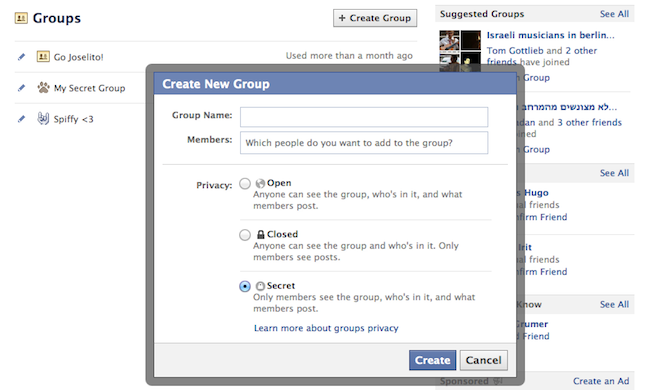
Make your own private space on Facebook and invite only people that you want! Go to Facebook Groups Page and click “Create Group”, then choose the “Secret” option.


4. Download Entire Photo Albums

Download Entire Photo Albums

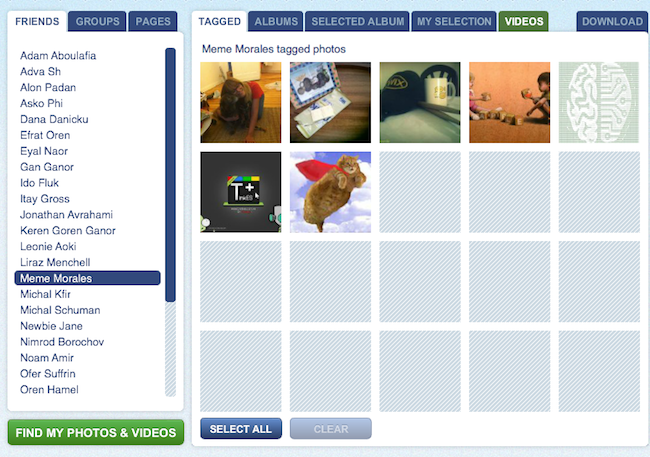
Want to make sure your Facebook photos are safe? Save them to your computer! Use Pick’n’Zip to log in with your Facebook account and choose the albums you’d like to download.


5. Choose Who Can See You on Facebook’s Online Chat 

Who can see you on Facebook chat

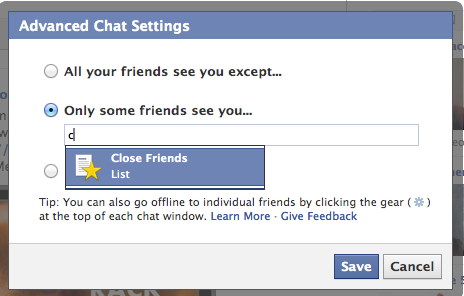
No need to apologize. We all have some people on our files that we don’t always feel like talking to. All you have to do is the click the ‘Settings’ icon at the bottom of the chat section, go to “Advanced Settings” and make your choice.


6. Post Upside-Down Texts

Write upside down Facebook posts

Drive your pals a little nuts with FlipText, a fun Facebook trick that automatically turns everything you write upside down. Just a simple copy/paste and your post is flipping.


7. Language/Geo-Target Fan Page Posts

Did you know you can make your posts visible only to people in your city? Or only to people in a certain country who speak a certain language? When you write a post, change the “Public” status according to your wishes and target your specific group of interest.


8. Edit Your Published Comments

Edit Your Published Comments


Typos? Misunderstandings? Freudian slips? Thankfully, Facebook lets users edit their comments quite easily. All you need to do is roll over the comment, click on the pencil icon and edit away!


9. Have Some Laughs with Pirate English

Pirate English

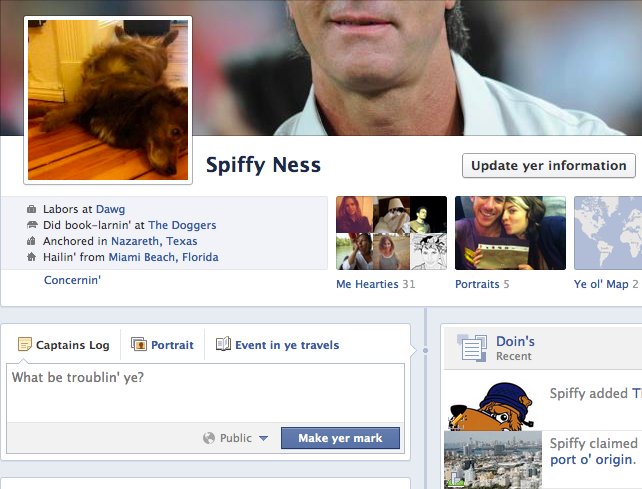
Normal languages aren’t nearly as fun as pirate talk! You can change the entire Facebook terminology to pirate English by going to your Account Settings and changing the language choice. Forget about Likes, they’re called “Arrr, This be pleasin’ to me eye” now.


10. Discover Messages that Facebook Hides

Find hidden messages

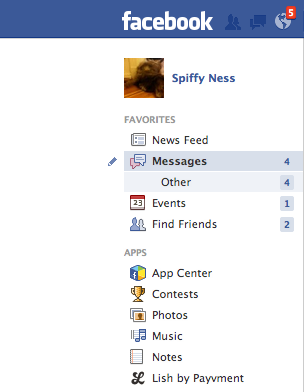
Not many people know that Facebook messages get split into two folders: Messages and Other. If you haven’t looked into the Other folder before, you probably missed some messages you didn’t want to miss.


11. Turning Off Notifications from Apps, Users, Etc.

Have too much spam coming in from an event, a group or a page? You can shut notifications off by clicking on the notifications icon (the globe), rolling over the nuisance with your mouse and clicking X to delete. Faceboook will then ask you if you want to turn off notifications from that user permanently.


12. Customize Your “Posted Via” Line

Customize Your “Posted Via” Line

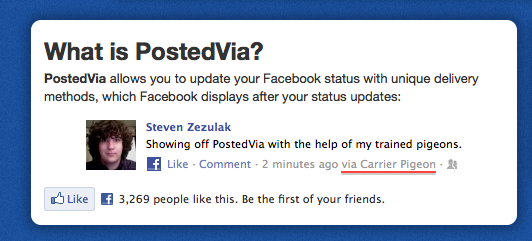
Another fun trick you can do to spice up your Facebook posts is to add a customized “Posted Via” line with this awesome Facebook tool. You can publish your posts from Air Force One, from a banana phone or via Jedi mind control, to name just a few.

13. Delete Your Facebook Account
If the day comes when you decide to leave the blue planet and go out into the real world, this link will be the red pill that takes you there. Hope you enjoyed the ride.
red pill vs blue pill

reality


Facebook’s crazy sticker app is now available for iOS

Last week, Facebook surprised us with a new app that lets you put stickers on photos, but it was available for Android users only.


The app lets you put stickers on any photo; you can import an existing photo or take a new one and add stickers to your heart’s content. Stickered is geared up to drop you into Facebook Messenger after you’re done, but you don’t need it to use the app.

stickered press 011 730x657 Facebooks crazy sticker app is now available for iOS

Facebook today made the app available for iOS in addition to the app released last week for Android users, so you can sticker up your photos just in time for Christmas.

➤ Facebook Stickered [iOS App Store]


Microsoft may unveil virtual reality headset at E3

oculus_rift_sideon_02

Facebook acquired one, Sony created one itself, Google made one out of cardboard, and now Microsoft is rumored to be preparing to launch one. What am I talking about? Virtual reality headsets.


There is an enormous amount of hype surrounding virtual reality this year, mainly due to the experiences being shown off for use with the Oculus Rift. A lot of them look very promising, and could kickstart a new era of immersive gaming. It has yet to be proven whether virtual reality will become a mass market consumer product, though, but with Facebook now funding Oculus, and Sony’sProject Morpheus looking likely to see a release, Microsoft could be left at a disadvantage in the gaming space if it didn’t join in.

With that in mind, Microsoft’s hardware team is thought to be working on its own virtual reality device. The source of the rumor is the supply chain, through which Microsoft would source the required components to make a headset prototype. The big unveiling of this product is expected to be E3 2015 being held in June next year.

Kinect for Windows

Microsoft entering the virtual reality market was actually inevitable if you think about it, and the company does have an advantages over its rivals in the form of Kinect. It has become clear that being able to see your own arms (or even your whole body) during a virtual reality experience makes a lot of difference to how immersive (and interactive) it can be. Kinect is perfect for tracking body part movement, so it seems likely any Microsoft VR headset would incorporate Kinect tech as standard.


10 best tech companies to work for in 2015

  • 1. Google

    Google

    The popular company is the top dog in the tech realm, and also conquered this year’s list overall.

    “The benefits and care of employees is obviously world-class, and compensation is almost unmatchable. But the company attracts some of the best talent and best people to work with in the world, which is the most important bit,” writes an anonymous Google program manager in San Francisco, California.

    2. F5 Networks

    F5

    The application delivery network came in fourth place overall, but snagged the second spot on the tech list.

    “Very competitive salary, great benefits that challenge the huge multi-nationals. Plus, the culture is something that makes your day worth being in the office, the atmosphere where everybody understands we are in the same ship and we need to sail it together,” writes an F5 networks software engineer in Seattle, Washington.

    3. Facebook

    Facebook

    Mark Zuckerberg knows how to keep employees happy, whether by offering a video game room or free egg freezing for female employees (though that perk has been divisive).

    “The amount of power entrusted to employees is huge. You are empowered to go explore and find data, build things and generally choose the course of action you think will have the most impact,” writes a Facebook user operations associate.


    4. Qualcomm

    Qualcomm

    Telecommunications company Qualcomm is always getting praise for its career culture. Just this year, it was cited one of the highest rated tech companies for internships. Clearly it’s doing something right.

    “[I] get to work on new technology, skills and products in the mobile space. Very good on-job training and an immense library and training resources. Good work-life balance in some divisions,” writes an anonymous Qualcomm staff engineer/manager in San Diego, California.

    5. Adobe

    Adobe

    The software company that brought us editing tools like Photoshop and InDesign lands at No. 5 on this list.

    “Adobe takes very good care of their employees; they make sure you get what you want from training to benefits. I simply enjoy going to work, enjoy sharing my ideas with intelligent (and humble) people who are always ready to help,” writes an Adobe software engineer in San Jose, California.

    6. MathWorks

    Glassdoor

    Mathematic software company MathWorks seems to have found the perfect formula for employee happiness.

    “Very friendly and supportive co-workers. Awesome perks. Company really cares about employees. Lots of opportunities for leadership roles. Easy switch to different teams,” writes an anonymous MathWorks applications support engineer in Natick, Massachusetts.

    7. Apple

    Apple

    It was a big year for the tech behemoth — new iPhones, ultra thin iPad Airs and smartwatches rained galore. Aside from forcing everyone to love U2, Apple is still a plush gig for employees.

    “Apple offers crazy benefits, and competitive salary. By competitive, I don’t mean a couple grand more in a year, I’m talking about a 2X / 2.5X salary. This place is a sea of knowledge. Never seen a more dedicated group,” writes an Apple product design engineer in Cupertino, California.


    8. LinkedIn

    Linked1

    Networking social platform LinkedIn knows a thing or two about careers, so it makes perfect sense the company lands on this list.

    “Besides the free food, there are lots of nice little company-sponsored events and things that happen. You can get professional development training easily. Your work schedule is generally pretty flexible,” writes a LinkedIn site reliability engineer in Mountain View, California.

    9. Zillow

    Zillow

    Real estate database Zillow amped up its online presence this year by buying Trulia, which makes for an exciting 2015.

    “If you’re looking for a company that really cares about culture and happy employees, that’s Zillow to a T. You’re working with talented team members who are really passionate about their jobs, and their role in moving Zillow forward,” writes an anonymous Zillow software development engineer in Seattle, Washington.

    10. MINDBODY

    Mindbody

    As its name suggests, MINDBODY works to help small businesses grow, particularly in the realm of health and fitness.

    “We’re treated great with so many benefits: monthly wellness vouchers, onsite massage, onsite wellness classes, insurance, paid time off, etc. Managers are great! CEO is inspiring and visionary. From the top down funnels good vibes,” pens a MINDBODY customer service/technical support employee in San Luis Obispo, California.