Top 10 sites to protect your online privacy

websites-privacyOnline Privacy is one of the major concerns among the citizens today. It is no secret that companies and websites keep a check on your online habits and store your personal information (sometimes messages or emails). The information leaves you open to hackers and is sold to third parties including government.

Here’s a list of 10 websites and services to protect your online privacy and help you stay anonymous to some extent on the Internet.


1) TOR

The Onion Router, more famously known as TOR, is by far one of the best ways to protect your online privacy. TOR is a free software that directs the Internet traffic through more than 6,000 relays worldwide. TOR conceals your identity and encrypts your query, thus, giving you safe passage inside the world wide web.

TOR saves you from the direct cyber attack. You will be amazed to see the intensity of cyber attacks across the globe in the Norse Map taking place right now.

2) DuckDuckGo

DuckDuckGo is a privacy-focused search engine and since last two years has witnessed a whopping 600% growth, especially after the NSA leaks. DuckDuckGo goes by catchphrase of “the search engine that doesn’t track you”.

The website promotes strict online privacy measures and claims that it doesn’t collect information about its users, and neither sends your IP address while crawling the web. DuckDuckGo is the search engine you would want to prefer to protect your online privacy.

3) StartPage

Startpage is another private search engine that subroutes your queries to Google, through itself. The searches are seen from the StartPage’s servers and give you anonymity on Google. Just like DuckDuckGo, Startpage doesn’t monitor your IP address and provides you with enough online privacy.

4) MyPermissions

MyPermmission is an extension that tells you which of your apps are connected to your social media accounts such as Facebook or Google which can possibly track your online actions. Once known, you can revoke those permissions.

MyPermissions will also inform of such actions in case you install new apps, thus, helping you to protect your privacy online.

5) Hide My Ass

Hide My Ass is a paid VPN service that hides your real IP address and gives out one of its own. In this way, you stay protected, no matter which website you visit.

Hide My Ass also allows you to circumvent and gives access to the blocked websites. A definite thumbs up for this VPN service that gives you online privacy.

6) Express VPN

Express VPN brags of both the security and speed. Express VPN is SSL secured with 256-bit encryption and optimizes continuously to provide the users a super fast encrypted network.

Express VPN provides online privacy and secure surfing for $12.95 per month and an annual subscription of $99.95.

7) IP Vanish

Another paid VPN service provider that allows to surf the Internet anonymously and gives you access to the blocked websites for $77.99 per year subscription.

IP Vanish protects your identity through its encrypted channels, so comes in the list of ways to protect your online privacy.

8) Just Delete Me

Just Delete Me is a directory of direct links that helps you to erase all of your digital footprint by deleting your accounts from web services. The directory has hundreds of websites including social media sites like Facebook, messaging apps like Snapchat, and even Google.

If someday anxiety over online privacy gets to you, then remember Just Delete Me.

9) Buffered VPN

Buffered VPN is in the list of paid VPN services that protects your privacy by hiding your IP Address and allows you to overcome firewalls. You can use Buffered VPN for a secure browsing experience and protect your online privacy.

10) ToS;DR

Terms of Service; Didn’t Read is the service for you if are skeptical and fed up of all the terms and conditions that are provided for the simplest of the anonymity services. It helps you to understand the intricacies of all the T&C and tells you how the services use your data . ToS;DR saves you from false promises and tricks and helps you to safe and protect your online privacy.


If you like our posts please like us on facebook and support us.

Please let us know about your views in comments.


Top 10 Evil Ways to Use Technology

sasf

Like other powerful tools, technology can be used for great good or for great evil. Learn how people use technology for wrongdoing so you can protect yourself—or use their tricks to actually do good. Here are the top 10 “evil” ways you can use technology.


10. Spoof Caller ID

1498356558990664083Pranksters and scammers use caller ID spoofing to take advantage of us—in common telephone scams, for example, where “Microsoft” calls to warn you your computer has a virus and they’ll help you fix it (for a fee). There are legitimate reasons why you might want to make your phone number show up differently on caller ID (e.g., place a call to a young kid as Santa or Cinderella), and there are lots of spoofing apps and services to help you do this.

9. Uncover Blurred Information in Photos

blurPeople blur out the information in photos to make sure sensitive information isn’t readable to others, but it turns out this strategy isn’t that secure—particularly when you’re trying to hide numbers. The takeaway: Don’t use simple mosaics to blur your image.

8. Create a USB Password Stealer

usb stealer.png

It’s bad enough that major password leaks happen so often, hackers can steal our passwords with just a USB flash drive and a single script, grabbing our cache of passwords stored in our browser and elsewhere. You might want to test your vulnerability to this trick yourself, but either way, to protect yourself, remember the security basics: always have physical control over your computer, use a secure password manager and turn on two-factor authentication.

7. Get into a Private BitTorrent Tracker or Usenet Indexer

bittorrent.pngPrivate trackers and usenet indexers are great communities, but they take dedication and they’re hard to get into. While some of our strategies for getting into one aren’t necessarily “evil,” you’ll be working your way into exclusive private file sharing communities.

6. Spoof an Email Address

spoof.pngCaller ID isn’t the only thing spammers spoof. If you’ve ever gotten a strange, spammy email from a friend—or, worse, your email account just spammed all of your contacts—you know how annoying spoofed emails can be. Here’s how data thieves spoof email addresses to phish for information or con us into sending money to Nigerian princes. If you think you’ve been impersonated, you’ll need to take some advanced steps to secure your account.

5. Snoop on Someone’s Phone or Computer Without Them Knowing

snoop

Is your company monitoring you? Possibly. The NSA? Your ISP? Yeah. But it’s pretty easy too for a friend or family member to dig into your phone or computer without you knowing—whether by gaining physical access to your phone or computer or using remote monitoring tools. Parents might snoop on their kids, significant others might snoop on their partners out of insecurity or suspicion, whatever the reason, covering those snooping tracks isn’t that hard. If you think you might be the one being snooped on, look for signs any of those stealthy steps weren’t followed. If you share a computer with someone else, learn how you can still protect your privacy with this guide.

4. Crack a Wi-Fi Password

crackWEP passwords are too easy to crack with tools like BackTrack making it super simple to get into a WEP-”protected” router. That’s why everyone recommends using WPA—or really, WPA2, the latest encryption standard.WPA can be cracked too, though! That is, if your router has WPS turned on. So disable WPS if you can or try open-source router firmware like DD-WRT, which doesn’t support WPS.

3. Hack a Wi-Fi Network

hack wifi.pngWhy would someone want to steal your router’s password? Besides stealing your Wi-Fi bandwidth, to spy on everything going on over your network, of course. It’s amazing the DIY creations hackers can use to sniff out network packets. Fake routers and networks, created with the help of Kali Linux, for example, can be used to trick machines into connecting, and then eavesdrop on network communications. (Yes, there’s a lot of spoofing going on in this article!) This is a good time to remind you to check your router’s settings—especially these top security settings.

2. Sniff Out Passwords and Cookies

This is somewhat related to hacking a Wi-Fi network, but it’s more about the dangers of using public Wi-Fi. It’s really easy for hackers to steal your logins and snoop on your browsing session, when the network is not secure or you’re connecting to sites that don’t use HTTPS. To protect yourself, your best bet is to use a VPN whenever you’re using public Wi-Fi or follow some of these other safety precautions.

1. Break into a Computer

breakFinally, you might shudder to know it’s pretty easy to break into a computer, whether it’s a Windows PC or a Mac—even if your computer is password protected. If your computer is encrypted, however, such as with BitLocker (for Windows) or FileVault (on Mac), you’ll be protected from some of the more common methods hackers use to steal data from a computer. You’ll also want to make sure you have a very strong, unique password for your computer login. If you get locked out of your computer, however, and forgot your password, well, now you know how to get back in.


If you like our post please like us on facebook and support us.

Please share your views in comments

10 Powerful hacking tools for Kali linux

maxresdefault

Kali Linux, the hacker’s operating system is very powerful Linux distro and it is my favorite OS, not only my favorite but also many Hackers and pentesters choosing Kali Linux as their favorite hacking tool. The main reason hackers and newbies like Kali is because it is blessed with 300+ hacking tools and it has developed by Offencive Security team, so today i want to introduce you the top 10 tools i like most in kali linux. Here i am giving tutorials for each hacking tools so everybody can understand it well.

1. Metasploit

Metasploit has become over the years the best framework to conduct penetration testing on network systems and IT infrastructure. The Metasploit Project, or better known as simply ” is a hugely popular pentesting or hacking tool that is used by cyber security professionals and ethical hackers. Metasploit is essentially a computer security project that supplies information about known security vulnerabilities and helps to formulate penetration testing and IDS testing.

Metasploit is in fact a sub-project of the Metasploit Framework. This hacker tool and framework is best known for its anti-forensic and evasion tools, some of which are built into the Metasploit Framework.

2. THC Hydra

Although often considered as yet another password cracker, THC Hydra is hugely popular and has a very active and experienced development team. Essentially THC Hydra is a fast and stable Network Login Hacking Tool that will use dictionary or brute-force attacks to try various password and login combinations against an log in page. This hacking tool supports a wide set of protocols including Mail (POP3, IMAP, etc.), Databases, LDAP, SMB, VNC, and SSH.


3. Sqlmap

Basically its just a tool to make Sql Injection easier. Their official website introduces the tool as -“sqlmap is an open source penetration testing tool that automates the process of detecting and exploiting SQL injection flaws and taking over of database servers. It comes with a powerful detection engine, many niche features for the ultimate penetration tester and a broad range of switches lasting from database fingerprinting, over data fetching from the database, to accessing the underlying file system and executing commands on the operating system via out-of-band connections.”


4. Nikto

There are a number of tools and applications to find vulnerabilities in websites, but one of the simplest (and one of my favorites) is nikto.

This small and simple tool examines a website and reports back to you the potential vulnerabilities that it found that you could use to exploit or hack the site. In addition, it’s one of the most widely used website vulnerabilities tools in the industry and in many circles considered the industry standard.


5. Ettercap

Ettercap has a huge following and is widely used by cybersecurity professionals. Ettercap works by placing the users network interface into promiscuous mode and by ARP poisoning the target machines, i.e. facilitating a ‘Main In The Middle’ or MITM attack. Once successfull Ettercap (and the hacker) can deploy various attacks on the victims. A popular feature about Ettercap is its’ ability to support various plugins.


6. BeEF


BeEF was developed by a group of developers led by Wade Alcorn. Built on the familiar Ruby on Rails platform, BeEF was developed to explore the vulnerabilities in browsers and test them. In particular, BeEF is an excellent platform for testing a browser’s vulnerability to cross-site scripting (XSS) and other injection attacks.


7. Wireshark

Wireshark, formerly known as Ethereal, is one of the mostpowerful tools in a network security analyst’s toolkit. As a network packet analyzer, Wireshark can peer inside the network and examine the details of traffic at a variety of levels, ranging from connection-level information to the bits comprising a single packet. This flexibility and depth of inspection allows the valuable tool to analyze security events and troubleshoot network security device issues. It’s also priced right: it’s free!


8. Maltego


Maltego is capable of gathering information about either a network or an individual; here we will focus on the former and leave individual information gathering for another time. We will be looking at gathering info on all the subdomains, the IP address range, the WHOIS info, all of the email addresses, and the relationship between the target domain and others.


9. Msfvenom

From 8th june 2015 we will no longer receive the services of msfpayload and msfencode. They are going to retire permanently. Yeah! Permanently off course this is a bad news. These both tools are serving us since ten years but the time has come to say good bye. Thank you msfpayload and msfencode for serving us in every level of hacking or penetration testing we will never forget you.

But the good news is msfpayload and msfencode are being replaced by a new tool called msfvenom. This is the combination of both the tools, almost from three and half years this new tool is being tested and the time has come to use it.


10. Wireless Auditing

In this Section i am introducing you to the 3 wireless hacking tools, Aircrack-ng, Reaver, and Pixiewps. PicaTesHackZ do not condone the illicit activities of wireless auditing on unauthorized systems. We do however encourage you to use this knowledge to your benefit to learn and practice exploitation using the latest in Wireless Auditing. Although I did do a write up about using reaver and pixiewps, there has been updates, I have more tests, and more knowledge on the tools. Please keep in mind it is illegal to penetrate networks that are not your own without proper permission. This falls on you, so do what you will but we will hold no liability for your actions.
If you have some of your own favorites please let us know in comments.

Google refuses to patch android vulnerability, leaving millions of android devices vulnerable!

Android mascot broken
Owning a smartphone running Android 4.3 Jelly Bean or an earlier versions of Android operating system ??Then you are at a great risk, and may be this will never end.
Yes, you heard right. If you are also one of millions of users still running Android 4.3 Jelly Bean or earlier versions of the operating system, you will not get any security updates for WebView as Google has decided to end support for older versions of Android WebView – a default web browser on Android devices.
WebView is the core component used to render web pages on an Android device, but it was replaced on Android 4.4 KitKat with a more recent Chromium-based version of WebView that is also used in the Chrome web browser.
Just a day after Google publicized a bug in Windows 8.1 before Microsoft could do anything about it, Tod Beardsley, a security analyst from Rapid7 who oversees the Metasploit project, discovered a serious bug in the WebView component of Android 4.3 and earlier that possibly left millions of Android smartphone users vulnerable to malicious hackers.
Android KitKit 4.4 and Lollipop 5.0 are not affected by the vulnerability, but over 60 percent of Android users – close to a billion people (950 Million) – still use the older version of Android 4.3 or below, which clearly states that the bug still affects more than a lot of people.
However, the response from Google after Beardsley notified the vulnerability made him and everyone of us stunned. Well, the tech giant won’t patch the vulnerability in the WebView at all. The quote from Google to Beardsley is as follows:

If the affected version [of WebView] is before 4.4, we generally do not develop the patches ourselves, but welcome patches with the report for consideration. Other than notifying OEMs, we will not be able to take action on any report that is affecting versions before 4.4 that are not accompanied with a patch.

As a result, only devices running KitKit 4.4 and Lollipop 5.0 will receive security updates for WebView from Google and the remaining Android versions will remain unpatched or rely on fixes from third party developers. The company has said that it will welcome third-party patches.

Google’s reasoning for this policy shift is that they ‘no longer certify 3rd party devices that include the Android Browser’, and ‘the best way to ensure that Android devices are secure is to update them to the latest version of Android’,” explained Beardsley.

On its face, this seems like a reasonable decision. Maintaining support for a software product that is two versions behind would be fairly unusual in both the proprietary and open source software worlds.

In other words, in case if a hacker or a cyber criminal finds a way to exploit WebView on older versions of Android OS, Google will not release any patch for the vulnerability itself. However, if any outsider develops a patch, Google will incorporate those patches into the Android Open Source Project code and will further provide them to handset makers. This is where the company’s responsibility get over.

Though, Google says that WebView support in older versions of Android operating system is baked firmly into the operating system in such a way that it makes much harder for Google to create a patch to affected devices. This issue has been mitigated by the search engine giant in newer versions of Android by dropping WebView from the core OS and incorporating it into the Google Play Services app.

If you have some suggestions of your own please let us know in comments!


What is DDOS attack?

Today, every information we shares on the internet, are being saved somewhere in server. It is very important to keep servers alive to access those information. Some information can be share to anyone but some of them are very important for us and we can’t let anyone know. Hackers always try to get private information to do their dirty work.

But, Hacking is not just about stealing the information. When hackers do not get success in stealing , they try to down the whole server. In this case, we may lose all the information on the server if we don’t have backup or a proper defense.

Now a days, we hear about attacks on gaming networks , news websites, bank websites etc. And when i write about those attacks i mention one term that is ‘DDoS’. Many readers may already know about ‘DDoS’ attacks but many of them are still not aware and they always ask me : What is DDoS ?

So in this article, i  am going to explain everything you need to know about DDoS attacks. If you will have any question, you can ask in comment section.

Distributed denial of service (DDos) attack refers to the attempt to make online service unavailable through overwhelming it with traffic from numerous sources. DDoS attack targets a wide range of important resources including news websites, banks, and many more. They pose a challenge to people’s attempts to access or publish important information.A decade ago, DDOS was only a basic attack that trying to overwhelm connection with traffic with the aim of taking a certain web property offline. When leading web experts began fighting DDoS attack in the year 2000, the flood attacks ranged at 400 Mbps but as we speak they exceed 100 Gbps.

The attackers build a network of infected computers called botnet and spread the malicious software through websites, emails and social media. The machines are capable of being controlled remotely once infected without the knowledge of owners. These machines are then used like the army in launching an attack against the target. Some botnet are as strong as millions of machines. The floods are generated in numerous ways including sending more connection requests that exceeds what a server can handle. They can also be generated by having the computers send to the victim huge volume of random data with the intention of using up the target’s bandwidth. Some DDOS attacks are so huge that they can max out the whole country’s international cable capacity.

Specialized online marketers exist who buy and sell individual DDoS attacks or botnet. By using these marketplaces, anyone can pay some fee in order to silence websites that they disagree with or to bring to complete halt online operations of a particular organization. A week-long DDoS attack for instance that is capable of bringing a small firm offline could cost as little as $200.

Beyond the democratization of DDoS attacks are the advanced techniques and targets. Today DDoS involves a series of attacks targeting multiple devices that consist of the organization’s security infrastructure as opposed to targeting connection bandwidth only. They include various applications and firewall or IPS devices that organizations rely on such as DNS, SMTP, VOIP, HTTPS and HTTP. The latest version of DDOS attack is the common multi-vector attack that combines flood, state exhaustion and application attacks against the infrastructure devices in a sustained single attack. These attacks have gained popularity due to their effectiveness and the fact that they are hard to defend against.

Today’s new realities of DDOS attack require new approaches to defense. Network experts have been in the forefront in looking for ways to combat DDOS attack for some years now. The best defensive mechanism against the modern DDOS attack is the layered approach combining cloud based protection and on-premise. With this type of protection, you are guaranteed of 100% security for your organization against the entire spectrum of DDOS attacks. A digital attack map is also ideal for protection against a DDOS attack because it displays global DDOS activities on any particular day. It displays the attacks as dotted lines that are scaled to size and stored in line with their source and the destination countries of attack traffic when they are known.


If you have some suggestions of your own please let us know in comments!


Cool addons for your google drive, try it now!

Google Drive is really cool. While it’s a handy alternative for those who don’t have a word processor or any office suite for that matter, it is an amazing collaborative tool for those that have one to interact, edit and share what they are doing. Further, cloud is clearly the way to go, and Google Drive is an excellent example of this philosophy.

1.MindMeister


Turns any bullet-point list into a mind map, and automatically inserts it into your document. This is a great way to visualise lists and quickly add a graphical overview to your documents.

2.EasyBib

Allows you to easily create a bibliography for your research paper. Automatically cite books, journal articles, and websites just by entering in the titles or URLs. Format citations in MLA, APA, and Chicago style.

3.Mail2Drive

Makes it possible to create a Google Drive file straight from an email message. When you sign up, you receive a unique, secret email address. Any email sent to it automatically gets converted into a Google Drive file.

4.Google Slides

Lets you create and edit your own presentations. Not only does it have everything you need to pull together an awesome presentation, but you’ll never have to hit save again.

5.DriveTunes

Allows you to play mp3 and m4a audio files right from Google Drive. Queue and listen to music in Drive, rather than just previewing it.

6.Maps for Docs

This add-on will insert a Google Map in your open doc. Simply select the entire address text, click ‘Get Location’ menu item, review the Google Map, and click ‘Paste to doc’ button.

7.PandaDoc

Lets you add legally binding electronic signature to Google Docs to close deals faster. Consist of more than 100 free business document templates, fantastic and easy-to-use project management and CRM partner apps.

8.UberConference

Lets you quickly and effortlessly get all the editors and viewers of a document on a conference call so you can be more productive.


Best collection of Secret codes for smartphones


1. Complete Information About your Phone  

*#*#4636#*#*
 This code is used to get some  really interesting information about your phone and battery. It shows following 4 menus on screen:
  • Phone information
  • Battery information
  • Battery history
  • Usage statistics
2. Factory data reset
*#*#7780#*#*
This code is used for the factory data reset. It’ll remove following things:
  • All the Google account settings stored in your phone
  • System and application data and settings
  • Downloaded applications in your Internal SD!
It’ll NOT remove:
  • Current system software and bundled application
  • SD card files e.g. photos, music files, etc.
Note: Once you give this code, you get a prompt screen asking you to click on “Reset phone” button. So you get a chance to cancel your operation.
3. Format Android Phone
  *2767*3855#
4. Phone Camera Update
*#*#34971539#*#*
This code can be used to get information about phone camera. It displays the follwing 4 menus:
  • Update camera firmware in image (Don’t try this option)
  • Update camera firmware in SD card
  • Get camera firmware version
  • Get firmware update count
WARNING: Never use the first option otherwise your phone camera will stop working and you’ll need to take your phone to service center to reinstall camera firmware.
5. End Call/Power
*#*#7594#*#*
This one is my favorite one. This code is used to change the “End Call / Power” button action in your phone. By default, if you long press the button, it shows a screen asking you to select any option from Silent mode, AirPlane mode and Power off.
You can change this action using this code. You can enable direct power off on this button so you don’t need to waste your time in selecting the option.
6. File Copy for Creating Backup
*#*#273283*255*663282*#*#*
This code helps you in opening a File copy screen where you can backup your media files e.g. Images, Sound, Video and Voice memo.
7.  Service Mode
 
*#*#197328640#*#*
This code can be used to enter into Service mode. You can run various tests and also change settings in the service mode.
8. WLAN, GPS and Bluetooth Test Codes:
*#*#232339#*#* OR *#*#526#*#* OR *#*#528#*#*           – WLAN test
 
*#*#232338#*#*                  – It Shows WiFi MAC address


*#*#1472365#*#*                – GPS test


*#*#1575#*#*                      – Another GPS test


*#*#232331#*#*                  – Bluetooth test


*#*#232337#*#                    – Shows Bluetooth device address
9. Codes to get Firmware version information:
*#*#4986*2650468#*#* – PDA, Phone, H/W, RFCallDate


*#*#1234#*#* – PDA and Phone


*#*#1111#*#* – FTA SW Version


*#*#2222#*#* – FTA HW Version


*#*#44336#*#* – PDA, Phone, CSC, Build Time, Changelist number
10. Codes to launch various Factory Tests:
*#*#0283#*#* – Packet Loopback


*#*#0*#*#* – LCD test


*#*#0673#*#* OR *#*#0289#*#* – Melody test


*#*#0842#*#* – Device test (Vibration test and BackLight test)


*#*#2663#*#* – Touch screen version


*#*#2664#*#* – Touch screen test


*#*#0588#*#* – Proximity sensor test


*#*#3264#*#* – RAM version
These were Some of the Secret Hidden Android Codes which I have collected from Various website , if you have any suggestions , please comment below 🙂

Most needed mozilla addons for hackers


Firefox, No doubt one of the best and popular internet browser . but many of us don’t know a lot of thing which can make it perfect browser for computer geeks. So now i’m going to tell you some important firefox addons we must have.

1. FOX TAB

3D in your browser! FoxTab brings innovative 3D functionality to your Firefox. Now you can access your most favorite sites from the familiar FoxTab interface. FoxTab is a popular 3D tab management extension.

FoxTab powers Firefox with the following main features:

  • Top Sites (aka Speed Dial) for quickly accessing your favorite web sites.
  • Tab Flipper – to easily flip between opened tabs using mouse or keyboard gestures.
  • Recently Closed Tabs – for reopening a tab that was recently closed.
  • Choose between 6 attractive 3D layouts.

Download Link:

https://addons.mozilla.org/en-US/firefox/addon/8879/


2. GREASE MONKEY

Grease monkey extension allows you to customize the way a webpage displays using small bits of JavaScript. …!!

Download Link:
https://addons.mozilla.org/en-US/firefox/addon/748/


3. TAMPER DATA:

Use tamperdata to view and modify HTTP/HTTPS headers and post parameters. Trace and time http response/requests. Security test web applications by modifying POST parameters.
FYI current version of Google Web Accelerator is incompatible with the tampering function of TamperData. Your browser will crash.

Download Link:
https://addons.mozilla.org/en-US/firefox/addon/966/


4. XSS ME

Cross-Site Scripting (XSS) is a common flaw found in todays web applications. XSS flaws can cause serious damage to a web application. Detecting XSS vulnerabilities early in the development process will help protect a web application from unnecessary flaws. XSS-Me is the Exploit-Me tool used to test for reflected XSS vulnerabilities

Download Link:

https://addons.mozilla.org/en-US/firefox/addon/7598/


5. Sparky

Sparky is Alexa Internet’s free Firefox status bar plugin. Sparky accompanies you as you surf, providing you with Alexa data about the sites you visit without interrupting your browsing.

  • Discover website traffic trends — Is this site getting more popular, or less?
  • Get detailed traffic information including Reach and Rank — How does this site’s traffic compare to other sites on the Web?
  • Surf more efficiently with Related Links for each page — If I like this site, are there others that I might want to visit?
  • Gracefully navigate past dead end error pages — Enable Sparky’s optional custom error handling to get relevant alternative links when your browser encounters a network error.

Plus, as you browse with Sparky, you’re helping to make the Web a better place for everybody by contributing to the traffic information that Alexa provides.

Download Link:

https://addons.mozilla.org/en-US/firefox/addon/5362/


6. SQL INJECT ME

SQL Injection vulnerabilites can cause a lot of damage to a web application. A malicious user can possibly view records, delete records, drop tables or gain access to your server. SQL Inject-Me is Firefox Extension used to test for SQL Injection vulnerabilities.
SQL Inject Me is the Exploit-Me tool used to test for SQL Injection vulnerabilities.

The tool works by submitting your HTML forms and substituting the form value with strings that are representative of an SQL Injection attack.
The tool works by sending database escape strings through the form fields. It then looks for database error messages that are output into the rendered HTML of the page.

The tool does not attempting to compromise the security of the given system. It looks for possible entry points for an attack against the system. There is no port scanning, packet sniffing, password hacking or firewall attacks done by the tool.

Download Link:

https://addons.mozilla.org/en-US/firefox/addon/7597/


7. HACKBAR

This toolbar will help you in testing sql injections, XSS holes and site security. It is NOT a tool for executing standard exploits and it will NOT teach you how to hack a site. Its main purpose is to help a developer do security audits on his code. If you know what your doing, this toolbar will help you do it faster. If you want to learn to find security holes, you can also use this toolbar, but you will probably also need a book, a lot of Google and a brain :)

# The advantages are:
– Even the most complicated urls will be readable
– The focus will stay on the textarea, so after executing the url (Ctrl+Enter) you can just go on typing / testing
– The url in textarea is not affected by redirects.
– I tend to use it as a notepad :)
– Useful tools like on the fly uu/url decoding etc.
– All functions work on the currently selected text.
– MD5/SHA1/SHA256 hashing
– MySQL/MS SQL Server/Oracle shortcuts
– XSS useful functions
– And lots more ;) Go test it!

# Shortcuts

– Load url ( Alt + A )
– Split url ( Alt + S )
– Execute ( Alt + X, Ctrl + Enter )
– INT -1 ( Alt – )
– INT +1 ( Alt + )
– HEX -1 ( Ctrl Alt – )
– HEX +1 ( Ctrl + Alt + )
– MD5 Hash ( Alt + M )
– MySQL CHAR() ( Alt + Y )
– MS SQL Server CHAR() ( Alt + Q )

Download Link:

https://addons.mozilla.org/en-US/firefox/addon/3899/


Images to confuse google image search

Image recognition algorithms are becoming widely used in many products and services.


Images like these were created to trick machine learning algorithms. The software sees each pattern as one of the digits 1 to 5.

A technique called deep learning has enabled Google and other companies to make breakthroughs in getting computers to understand the content of photos. Now researchers at Cornell University and the University of Wyoming have shown how to make images that fool such software into seeing things that aren’t there.

The researchers can create images that appear to a human as scrambled nonsense or simple geometric patterns, but are identified by the software as an everyday object such as a school bus. The trick images offer new insight into the differences between how real brains and the simple simulated neurons used in deep learning process images.

Researchers typically train deep learning software to recognize something of interest—say, a guitar—by showing it millions of pictures of guitars, each time telling the computer “This is a guitar.” After a while, the software can identify guitars in images it has never seen before, assigning its answer a confidence rating. It might give a guitar displayed alone on a white background a high confidence rating, and a guitar seen in the background of a grainy cluttered picture a lower confidence rating.

That approach has valuable applications such as facial recognition, or using software to process security or traffic camera footage, for example to measure traffic flows or spot suspicious activity.

But although the mathematical functions used to create an artificial neural network are understood individually, how they work together to decipher images is unknown. “We understand that they work, just not how they work,” says Jeff Clune, an assistant professor of computer science at the University of Wyoming. “They can learn to do things that we can’t even learn to do ourselves.”

These images look abstract to humans, but are seen by the image recognition algorithm they were designed to fool as the objects described in the labels.

To shed new light on how these networks operate, Clune’s group used a neural network called AlexNet that has achieved impressive results in image recognition. They operated it in reverse, asking a version of the software with no knowledge of guitars to create a picture of one, by generating random pixels across an image.

The researchers asked a second version of the network that had been trained to spot guitars to rate the images made by the first network. That confidence rating was used by the first network to refine its next attempt to create a guitar image. After thousands of rounds of this between the two pieces of software, the first network could make an image that the second network recognized as a guitar with 99 percent confidence.

However, to a human, those “guitar” images looked like colored TV static or simple patterns. Clune says this shows that the software is not interested in piecing together structural details like strings or a fretboard, as a human trying to identify something might be. Instead, the software seems to be looking at specific distance or color relationships between pixels, or overall color and texture.
That offers new insight into how artificial neural networks really work, says Clune, although more research is needed.

Ryan Adams, an assistant computer science professor at Harvard, says the results aren’t completely surprising. The fact that large areas of the trick images look like seas of static probably stems from the way networks are fed training images. The object of interest is usually only a small part of the photo, and the rest is unimportant.

Adams also points out that Clune’s research shows humans and artificial neural networks do have some things in common. Humans have been thinking they see everyday objects in random patterns—such as the stars—for millennia.

Clune says it would be possible to use his technique to fool image recognition algorithms when they are put to work in Web services and other products. However, it would be very difficult to pull off. For instance, Google has algorithms that filter out pornography from the results of its image search service. But to create images that would trick it, a prankster would need to know significant details about how Google’s software was designed.


13 need to know Facebook tips and tricks

Everyone knows Facebook, but not everyone knows Facebook very well. You could spend your days on the world’s biggest social network liking and sharing, or you could learn a few tricks that will bring you closer to being a power user.
These 13 Facebook tricks will help you take charge of your Facebook activity. Use them wisely! If you have Facebook secrets of your own to share – do tell and leave us a comment!

1. Create & Manage Friends’ Lists

Create & Manage Friends’ Lists

Organize your friends in lists and control who can view what’s on your profile. Go to Facebook Lists Page and see the default lists prepared for you. Click on “Create List” to make your own.


2. Schedule Posts

Schedule Posts

Want to make sure your posts go live even when you’re offline? Use Facebook’s scheduling tool and set a publishing time for your posts. Click on the clock icon in the status line field and take it from there.


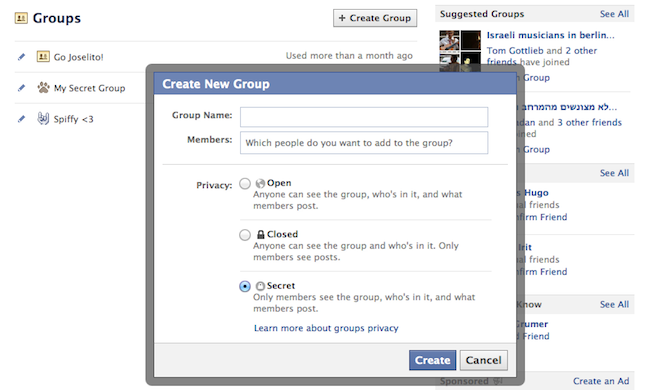
3. Create a Secret Group

Create a Secret Group


Make your own private space on Facebook and invite only people that you want! Go to Facebook Groups Page and click “Create Group”, then choose the “Secret” option.


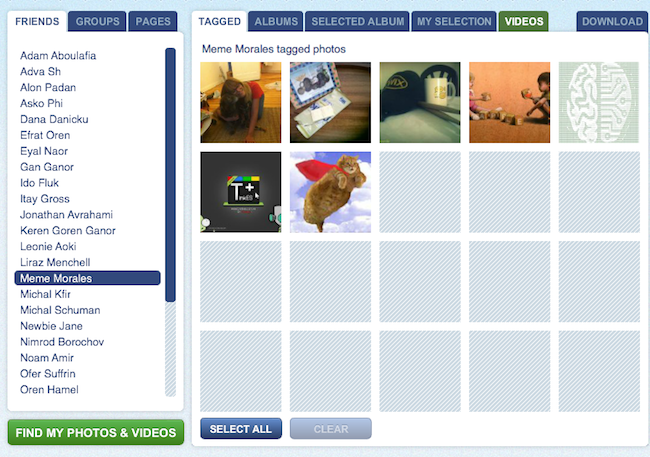
4. Download Entire Photo Albums

Download Entire Photo Albums

Want to make sure your Facebook photos are safe? Save them to your computer! Use Pick’n’Zip to log in with your Facebook account and choose the albums you’d like to download.


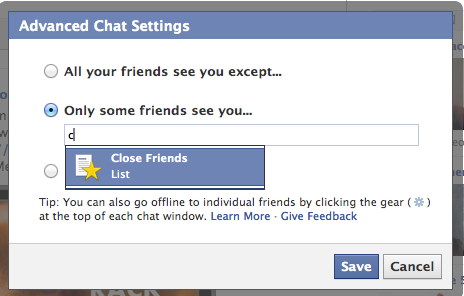
5. Choose Who Can See You on Facebook’s Online Chat 

Who can see you on Facebook chat

No need to apologize. We all have some people on our files that we don’t always feel like talking to. All you have to do is the click the ‘Settings’ icon at the bottom of the chat section, go to “Advanced Settings” and make your choice.


6. Post Upside-Down Texts

Write upside down Facebook posts

Drive your pals a little nuts with FlipText, a fun Facebook trick that automatically turns everything you write upside down. Just a simple copy/paste and your post is flipping.


7. Language/Geo-Target Fan Page Posts

Did you know you can make your posts visible only to people in your city? Or only to people in a certain country who speak a certain language? When you write a post, change the “Public” status according to your wishes and target your specific group of interest.


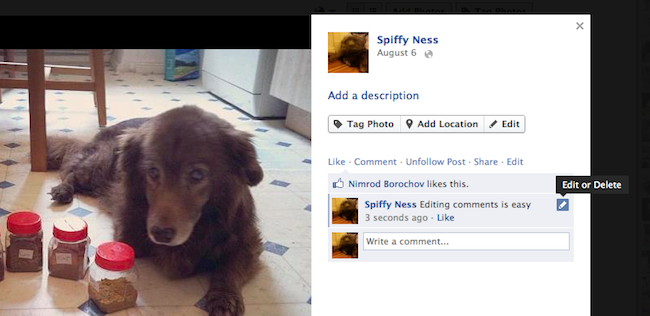
8. Edit Your Published Comments

Edit Your Published Comments


Typos? Misunderstandings? Freudian slips? Thankfully, Facebook lets users edit their comments quite easily. All you need to do is roll over the comment, click on the pencil icon and edit away!


9. Have Some Laughs with Pirate English

Pirate English

Normal languages aren’t nearly as fun as pirate talk! You can change the entire Facebook terminology to pirate English by going to your Account Settings and changing the language choice. Forget about Likes, they’re called “Arrr, This be pleasin’ to me eye” now.


10. Discover Messages that Facebook Hides

Find hidden messages

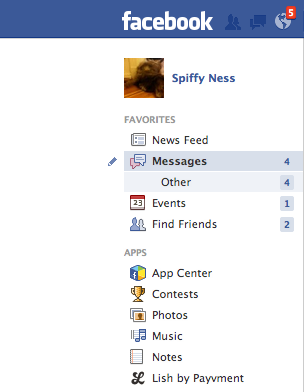
Not many people know that Facebook messages get split into two folders: Messages and Other. If you haven’t looked into the Other folder before, you probably missed some messages you didn’t want to miss.


11. Turning Off Notifications from Apps, Users, Etc.

Have too much spam coming in from an event, a group or a page? You can shut notifications off by clicking on the notifications icon (the globe), rolling over the nuisance with your mouse and clicking X to delete. Faceboook will then ask you if you want to turn off notifications from that user permanently.


12. Customize Your “Posted Via” Line

Customize Your “Posted Via” Line

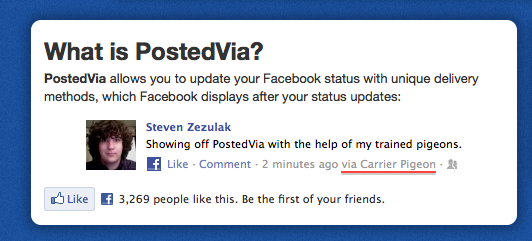
Another fun trick you can do to spice up your Facebook posts is to add a customized “Posted Via” line with this awesome Facebook tool. You can publish your posts from Air Force One, from a banana phone or via Jedi mind control, to name just a few.

13. Delete Your Facebook Account
If the day comes when you decide to leave the blue planet and go out into the real world, this link will be the red pill that takes you there. Hope you enjoyed the ride.
red pill vs blue pill

reality